

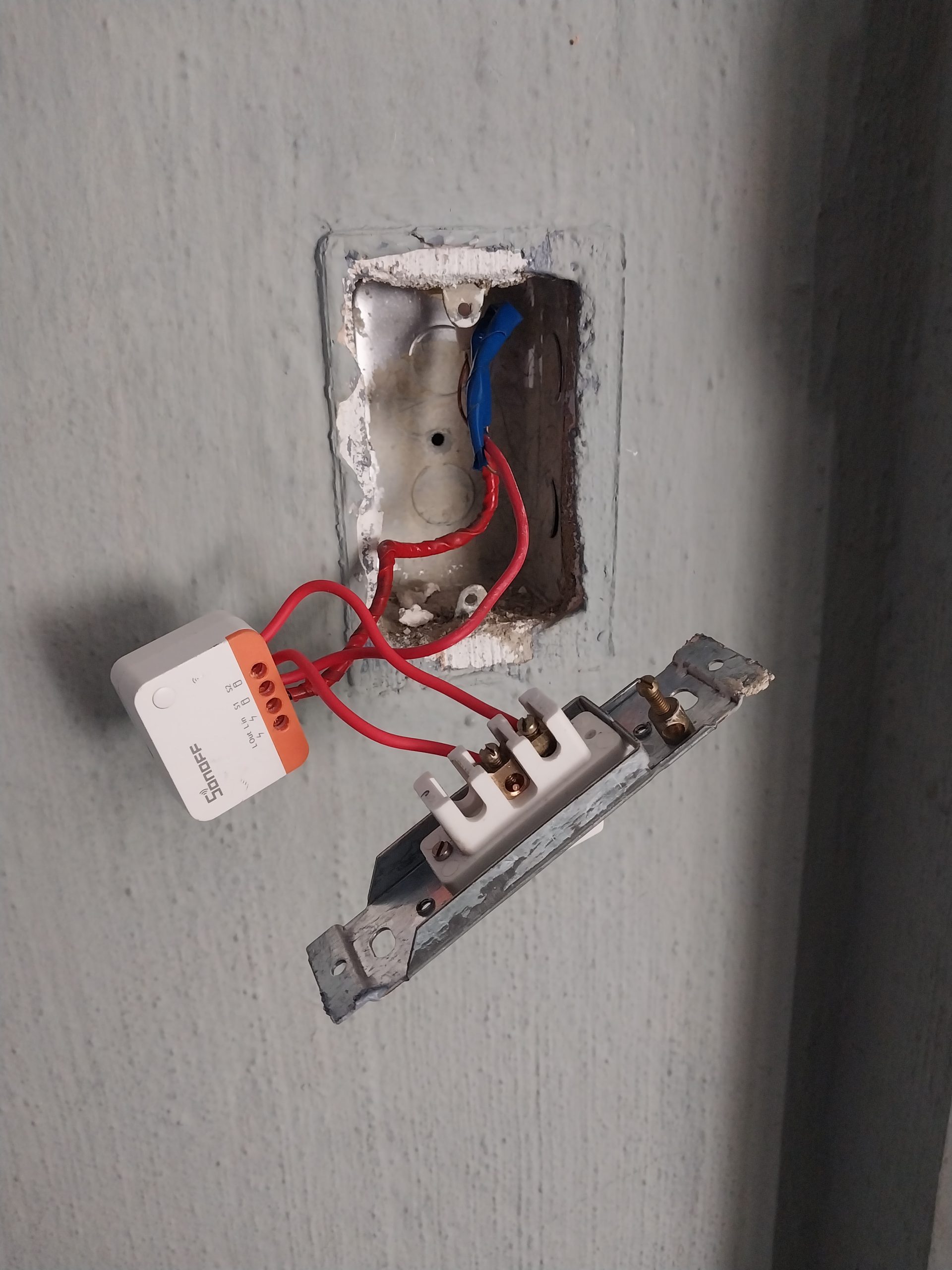


Sonoff Smart Switch Installation – Reliable, Affordable Home Automation
Smart homes require smart wiring — and Sonoff is one of the most popular, cost-effective brands for smart light and power switch automation. At Juspropa Electrical Services, we offer professional installation, configuration, and support for Sonoff devices, ensuring your installation is safe, stable, and compliant with South African electrical standards.
What Is Sonoff?
Sonoff is a brand under ITEAD, known for creating a wide range of smart home devices — primarily WiFi-enabled relays and switches. Their products are popular because they:
-
Are budget-friendly, making smart automation accessible
-
Operate on 2.4 GHz WiFi, not needing a separate hub
-
Integrate with major smart platforms — Google Assistant, Amazon Alexa, and Smart Life / eWeLink
-
Offer a variety of form factors (in-wall, DIN rail, plug-in modules)
Popular Sonoff models include:
-
Sonoff Basic / R2 / R3 — simple relay switch
-
Sonoff BasicZBR3 (Zigbee) — works over Zigbee mesh
-
Sonoff Mini / Mini R2 — small in-wall relay to fit behind standard switch
-
Sonoff TH — with temperature/humidity sensing
-
Sonoff POW — measures current and energy usage
Pros & Cons of Sonoff Switches
Pros
-
Affordability – Very cost-effective compared to premium smart switch brands.
-
Versatility – Many models to suit different control needs (in-wall, DIN, plug).
-
Easy Automation – Integrates with Google Assistant, Alexa, and eWeLink app for scenes, scheduling, timers.
-
Energy Monitoring – Some models (Sonoff POW) report energy usage, helping you track consumption.
-
DIY Friendly – With basic electrical knowledge and our guidance, many of these devices are straightforward to install.
-
Firmware Options – Advanced users can flash Tasmota or ESPHome for local control / custom automations.
Cons
-
WiFi Dependence – Requires stable 2.4 GHz WiFi; poor WiFi = unreliable switching.
-
Neutral Required (in many models) – Some in-wall Sonoff switches require a neutral wire, which may not exist in older homes.
-
Limited Power Handling – Not always suitable for very high-load circuits (consult specs).
-
Security Risks (Default Firmware) – Using default cloud firmware presents some risk; local firmware is safer but requires technical know-how.
-
Latency – Occasionally, there may be a small delay when toggling via app or cloud, especially during WiFi congestion.
-
Warranty vs Flashing – Replacing firmware (e.g. Tasmota) may void the official warranty; do so knowingly.
Typical Installation Scenarios for Sonoff Switches
Here are common use cases where we install Sonoff devices for clients:
-
Lighting Circuits – Install a Sonoff Mini behind your existing wall switch so your lights become controllable via app and voice.
-
Plug-Point Automation – Use a Sonoff S26 smart plug to remotely control a lamp, fan, or small appliance.
-
Energy Monitoring – Use Sonoff POW in a high-use circuit to measure and record energy consumption, integrated into home automation dashboards.
-
Temperature-Based Control – Sonoff TH units can switch on/off when temperature or humidity goes out of range — useful for heater or dehumidifier circuits.
-
Zigbee Mesh Building – Using Sonoff Zigbee models (e.g., BasicZBR3) to expand a smart-home network without overloading WiFi.
Our Sonoff Installation Process – How Juspropa Does It Right
-
Assessment & Planning
-
Verify wall box space, wiring (is there a neutral?), load size
-
Check WiFi signal strength at the switch location
-
Recommend the right Sonoff model for your circuit and use case
-
-
Safe Electrical Work
-
Turn off the circuit, verify with test equipment
-
Mount the Sonoff device (in-wall or DIN rail)
-
Connect Live, Load, Neutral (if required), and Earth (SANS-compliance)
-
Secure wiring neatly and safely
-
-
Configuration & Commissioning
-
Install / register the Sonoff device in the eWeLink app
-
Configure WiFi credentials, set up scheduling, scenes, and/or automations
-
Optionally flash advanced firmware (Tasmota / ESPHome) if client wants local control
-
-
Testing & Handover
-
Test switching by app, voice, and manual operation
-
Demonstrate scheduling and automation to the client
-
Label switch in the distribution board and update client’s as-built documentation
-
-
Support & Maintenance
-
Provide a brief guide on how to reset, reconnect WiFi, or restore defaults
-
Offer follow-up support for automation changes or expansions
-
Advise on firmware updates and security best practices
-
How People Fix Common Sonoff Issues (Real-World Scenarios)
Here are common issues clients run into (or DIYers report) — and how we, as pros, fix them:
| Issue | Cause | How We Fix It |
|---|---|---|
| Sonoff is offline / not responding | Weak WiFi signal | Re-position or install a WiFi mesh node; verify 2.4 GHz connectivity; sometimes add a repeater. |
| Switch flickers or turns off | Load too small or incompatible bulb | Add a bypass capacitor (if supplied) or use a louder load; adjust firmware settings to reduce flicker. |
| Device reboots / crashes | Poor power or overheating | Check for correct wiring, ensure proper neutral and stable supply; consider mounting in ventilated box. |
| Delayed response via app | Internet latency or cloud issues | Use local firmware (Tasmota) for LAN control; or create local automations via home server. |
| Firmware glitch after update | Unstable or incorrect flash | Reflash with correct firmware, backup configuration, and test thoroughly; revert to stable version if needed. |
Pros of Sonoff Smart Switch Over Traditional Switches
-
Remote Control: Turn lights on/off from anywhere; traditional switches require physical presence.
-
Energy Insights: Track energy use with Sonoff POW; manual switches provide no data.
-
Cost Efficiency: Sonoff allows schedule-based automation (e.g., switching off unused rooms), reducing waste.
-
Scalability: Easily expand your smart system; traditional wiring changes are costly.
-
Fail-Safe Usage: Even if WiFi fails, physical toggle still works — unlike cloud-only smart bulbs.
Is Sonoff Right for You? Situations Where It Makes Sense
-
You want smart control on a budget without replacing all bulbs.
-
You have an existing home and don’t want to rewire extensively.
-
You run a guesthouse, lodge, or Airbnb and want to automate common-area lighting.
-
You want data on energy usage or to integrate with a home automation hub.
-
You need zonal or schedule-based lighting (e.g., “evening mode,” “away mode”).
Where Juspropa Installs Sonoff (Service Areas)
-
Johannesburg (Sandton, Rosebank, Randburg, Houghton, Roodepoort)
-
Pretoria & Centurion
-
Fourways, Midrand, Edenvale
-
Residential, commercial, and hospitality clients throughout Gauteng
Book Your Sonoff Smart Switch Installation
-
SANS-compliant wiring and installation
-
Certified electricians
-
Full automation setup & handover
-
Ongoing support
Let’s make your home smarter — affordably, safely, and reliably.
Reviews
There are no reviews yet.